
Security Compliance
A comprehensive guide to Checkgrow's security protocols, infrastructure compliance, and user-controlled data management practices including deletion and portability.
Infrastructure & Hosting
At Checkgrow, security is not an afterthought — it is a foundational principle embedded in every layer of our platform architecture. From the moment you log in to the way your data is stored, processed, and eventually deleted, every interaction is governed by a set of technical controls and compliance standards designed to keep your information safe.
This page explains how we have built our security infrastructure, what certifications govern our practices, and what protections are active at all times while you use the platform.
Checkgrow's backend infrastructure is hosted on Supabase, built on top of AWS Frankfurt (eu-central-1), located within the European Economic Area.
Choosing an EU-based cloud region is a deliberate compliance decision; it means your data never leaves the EEA by default and remains under the full protection of European data protection law.
Your data stays in Europe.
All databases containing your content, AI-generated results, campaigns, and knowledge entries are hosted at AWS Frankfurt, Germany.
This ensures full GDPR compliance without requiring additional legal transfer mechanisms for primary storage.
SOC 2 Type 2 — Independently audited controls for security, availability, processing integrity, confidentiality, and privacy GDPR Compliant — Operates under EU data protection law with a signed Data Processing Agreement (DPA) HIPAA Eligible (High-availability infrastructure meeting healthcare-grade data protection standards).
Encryption & Access Control
All data handled by Checkgrow is protected through industry-standard encryption protocols:
In Transit: All data exchanged between your browser and our servers is encrypted using TLS 1.3, the latest and most secure version of the Transport Layer Security protocol. No data is ever sent over unencrypted connections.
At Rest: All stored data is encrypted using AES-256, a symmetric encryption standard used by governments and financial institutions worldwide. This includes your files, Knowledge Base entries, campaign data, and AI chat history.
Checkgrow implements a multi-layered access control model:
Role-Based Access Control (RBAC): Every user is assigned a role — Member, Admin, or Master Admin — and access to platform features and data is strictly governed by that role.
Row-Level:
Security (RLS): At the database layer, every table that stores user or company data has RLS policies enforced. This means that even within the platform, a query for your data can only return rows you are authorized to see — enforced at the database engine level, not just the application layer.
Company-Scoped Data Isolation: All company data is scoped by company name across all tables. Members of one company cannot access data belonging to another company, even if they are on the same platform.
Sharing your login credentials with others is a violation of our Terms of Service and exposes your company's data to unauthorized access. Each user must have their own individual account.
Authentication & Bot Protection
Checkgrow uses Supabase Auth as its authentication backbone, which provides:
Email Magic Links: Passwordless authentication via one-time email links — reducing password-related vulnerabilities;
Password Authentication: Optional password login with secure bcrypt hashing; passwords are never stored in plain text;
Google OAuth: Sign in with your Google account using industry-standard OAuth 2.0;
Secure Session Management: Authentication tokens are stored in localStorage with first-party isolation, preventing cross-site tracking.
To protect the login and registration flow from automated attacks, credential stuffing, and fake account creation, Checkgrow employs Cloudflare Turnstile — a privacy-preserving alternative to traditional CAPTCHA.
Runs silently in the background without requiring users to solve visual puzzles;
Does not track users across websites;
Validates that a real human is attempting to access the platform;
Can be enabled or disabled by platform administrators at any time.
Cloudflare
Cloudflare is certified under GDPR, SOC 2 Type 2, and ISO 27001 and has a signed Data Processing Agreement (DPA) with Checkgrow.
The Turnstile widget processes only the minimal data needed to verify human presence.
Deleting Your Data
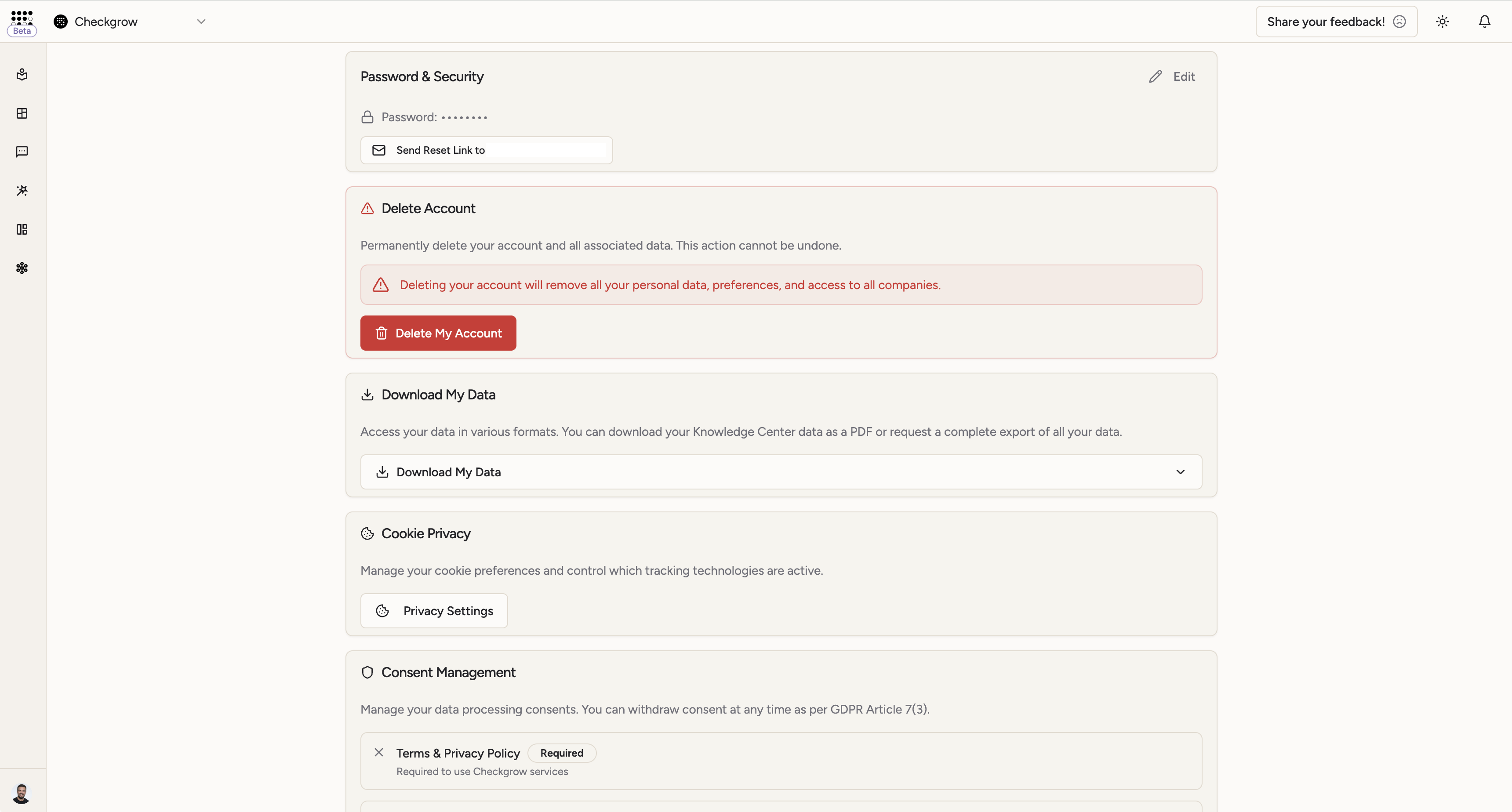
Checkgrow gives you complete authority over your personal data and company information. You can delete your account at any time from within the platform, and the deletion process is designed to be thorough, transparent, and immediate.
Navigate to My Account (accessible from the top-right menu or sidebar)
Scroll to the Delete Account section at the bottom of your profile tab
Click Delete My Account
Follow the three-step confirmation dialog
This action is permanent and cannot be undone. Once deletion is confirmed, your account, personal data, and any sole-owner company data will be permanently removed. There is no recovery path.
Step 1 — Review Impact
Step 2 — Optional Work Transfer
Step 3 — Final Confirmation
Downloading Your Data
Checkgrow provides you with straightforward tools to access and export your data. Whether you need a quick reference document or a complete archive for portability purposes, both options are available directly from your account settings — no need to contact support.
This is a fundamental part of your rights under GDPR Article 15 (Right of Access) and GDPR Article 20 (Right to Data Portability).
The Knowledge Center PDF export generates an immediate, formatted document containing all Knowledge Base data associated with your selected company. This is the fastest way to get a structured copy of your company's intelligence data.
What is included:
Company profile and overview information
All Knowledge Base fields and entries
Competitor research and market intelligence
ICP (Ideal Customer Profile) data
Product and service documentation stored in the Knowledge Base
The PDF export requires a company to be selected in your profile. If you manage multiple companies, the export will reflect the currently active company. The file is named using your company name for easy reference.