
Content
An industry-trends radar: keyword-driven article curation from Google News, Perplexity and Gemini, with weekly AI summaries, highlights and hand-offs to AI Agents.
Overview
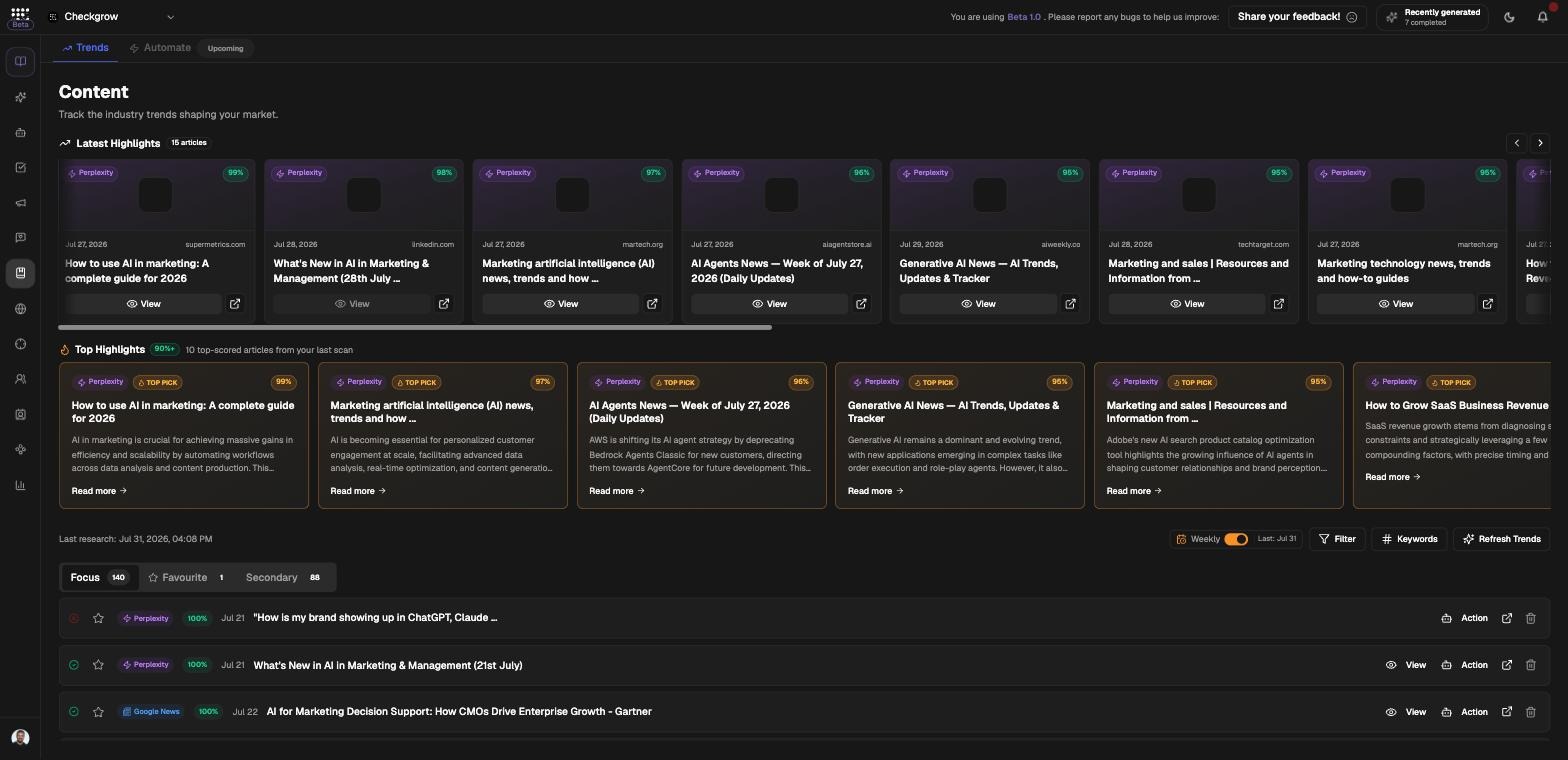
Content is an industry-trends radar — "Track the industry trends shaping your market." Using your keywords, it searches Google News, Perplexity and Gemini, then scores and curates the articles it finds.
The result is a highlights carousel (articles scoring 90% or higher), weekly AI summary cards and a browsable feed split into Focus and Favourite tabs.
Automate is upcoming
Content has two tabs: Trends and Automate. Automate is marked "Upcoming" and is not yet available — this article covers Trends. There is no content editor or publishing calendar in Content.
Who needs it
The trends radar suits anyone who needs to stay current without manual news-hunting:
- Content marketers looking for timely angles to build posts and articles around.
- Founders and strategists watching what is shaping their market week by week.
- Social teams who feed a hot trend straight to an AI Agent to draft content from it.
- Sales and product teams who want a curated weekly digest instead of raw news feeds.
Content shares its keyword configuration with Find & Reply in Social Media — tune your keywords once and both features benefit.
How to use it
- Set your keywordsOpen the Keywords settings in the toolbar and define the terms that describe your industry and market. These keywords drive every search.
- Unlock TrendsOn first use the radar is locked behind an "Unlock Industry Trends" card — click Unlock Trends to run the first scan. After a week, the card becomes "Refresh Your Trends" with a Refresh Trends button.
- Browse and filterScan the highlights carousel and the weekly AI summary cards, then browse the Focus and Favourite tabs. Use the keyword Filter in the toolbar to narrow the feed.
- Act on an articleEach article can be viewed, favourited or deleted — or handed off with Send this trend to an AI Agent, which passes it to one of your AI Agents to work with.
- Enable Weekly auto-refreshSwitch on Weekly in the toolbar and your trends refresh automatically every Monday. You can still click Refresh Trends manually at any time.
How the radar works
Sources and scoring
Each scan searches Google News, Perplexity and Gemini using your keywords, then scores every article for relevance. Only articles scoring 90% or higher make the highlights carousel; the rest are curated into the feed.
Weekly AI summaries
Summary cards condense each week's articles into a short digest, so you can catch up on the market in minutes rather than reading every piece.
Focus and Favourite tabs
Focus is the curated main feed; Favourite collects the articles you starred, building a personal swipe file of trends worth revisiting.
Refresh cycle
Trends refresh weekly — manually via Refresh Trends, or automatically every Monday when the Weekly switch is on.
Related features
AI Agents — send a trend to an agent and turn it into content
Social Media — Find & Reply shares the same keyword configuration